for TikTok LIVE · Windows

Your live,
on stage. When a viewer joins,
a character calls their name.

TC Studio is an all-in-one tool for TikTok LIVE streamers. Take care of your regulars with entrance greeting animations, special alert banners and viewer management, and connect your gift counter · TTS · roulette · menu board to OBS overlays. BASIC is free forever, and TTS is unlimited.

PRO onlyLIVE SETUP · open the stream setup manager →
LIVE👁 1,284
Today's gift counter🌹 Rose
2,418
Goal 5,000 · 48%
TTS

StarBunny: This stream is so fun today!

— EXAMPLE OVERLAY —
PRO ONLY · NEW

LIVE SETUP
Stream setup manager

Connect your PC to check your stream scenes and audio on the web, and manage your stream settings and backups in one place. For PRO buyers only.

  1. Check PRO — enter your purchase email and license key to unlock the link and sign-up invite code.
  2. Sign up on the web — sign up on the stream setup site with the invite code.
  3. Connect your PC — enter the connect code from Web connect in the PC connector app.
Check PRO

Not available on BASIC (including the trial). See PRO plan

Entrance Greeting PRO

The moment they join,
they're the star.

Pick a character and a greeting for each tier, and a character calls the viewer's name when they join. Celebrate regulars' attendance streaks and welcome legends with a red carpet.

REAL APP SCREEN · LIVE DEMO
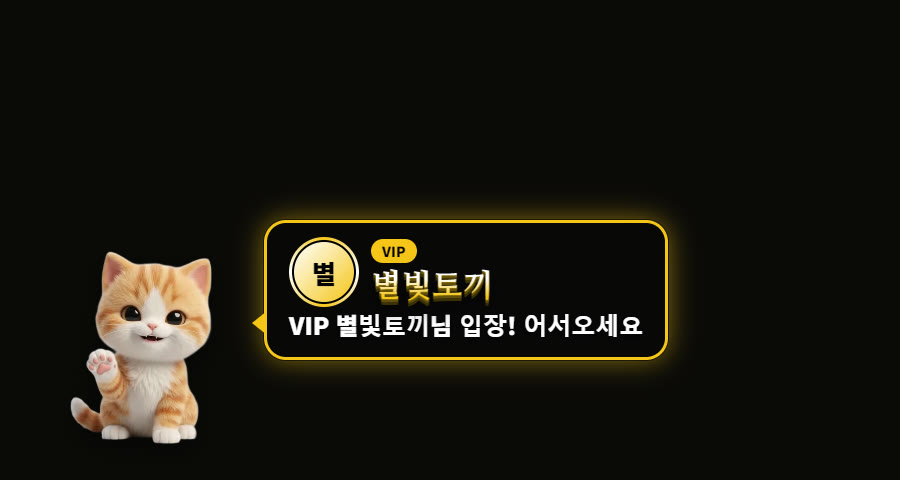
A cat character announcing a VIP viewer
Basic greeting · tier badge and greeting in a speech bubble
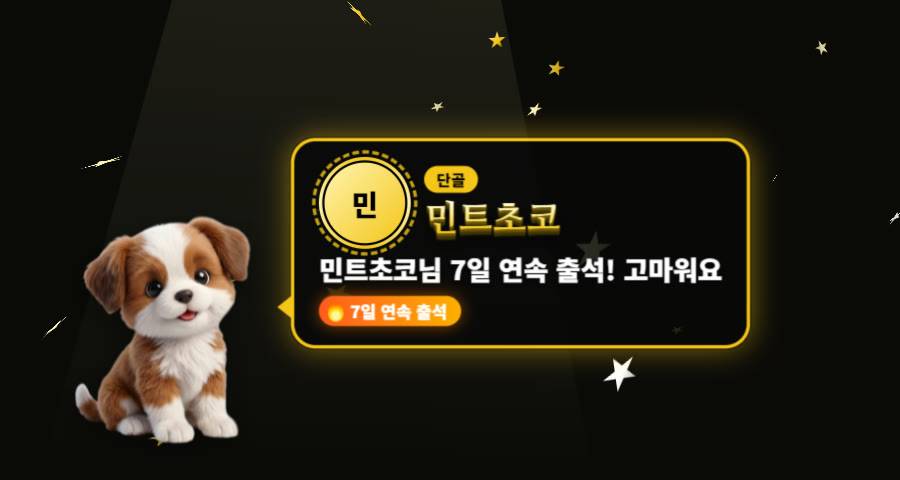
A puppy character celebrating a 7-day streak
Big effect · lights, falling stars and a streak celebration
A legend viewer welcomed on a red carpet
Red carpet · full-screen welcome for top supporters and legends
A small one-line welcome for a new viewer
Small alert · a one-line greeting that doesn't cover your stream
Special Alerts PRO

Just like TikTok,
make special moments big.

Show banners when a guardian joins, when the day's top 3 gifters join, on team level-ups and gifter level-ups. Banners are saved as images so you can show them again.

Features

Everything your stream needs,
in one app.

Connect one TikTok ID and every overlay moves in real time. Works with OBS and TikTok LIVE Studio.

Viewer CRM PRO

A stream that
remembers its regulars

Visit days, gifts and chats are collected per viewer even after the stream ends, and viewers get tiers. See team names, subscriber and guardian badges at a glance, and set a different greeting for each tier.

Tiers · badgesAttendance streaksTeam re-greetingsNotes · tags
0 viewers recorded (example)
Voice TTS FREE

Unlimited free TTS

Default voices, 19 character voices and per-gift voices are free with no limit. PRO adds high-quality AI voices.

Gift Counter · Sound

Gift counter · gift sounds

Counts per gift type, goal gauges, per-gift sounds and videos, and a soundboard.

Roulette · Menu Board

Drive engagement with roulette and a menu board

A capsule roulette spun by gifts, and a menu board showing per-gift missions and forced TTS. Try them free, go unlimited with PRO.

Live Report PRO

A report after every stream

Gifts, comments and likes over time, gifter ranking, new followers, match stats and PDF export. If you restart the app mid-stream, it still counts as one stream.

Game · Actions

Gifts move the game

Key presses and Minecraft actions, a LoL kill counter, and a PUBG counter (with free PUBG auto kills).

Translate · Song

Translation and song requests

Translate foreign-language chat for free, and turn your voice into subtitles (OBS subtitles on PRO). Song requests from chat are queued automatically.

Overlays FREE

One address, anywhere

Overlays on the same PC are free. PRO sends them through our server to another PC, so they also work in TikTok LIVE Studio on a second PC.

Updates · Roadmap

It never stops
getting better.

TC Studio is updated regularly. New features and fixes arrive automatically inside the app, and your feedback shapes the next update.

NOW · regular updates

Steady updates

New features and fixes ship regularly. Open the app and a patch brings you to the latest version in one step.

COMING · planned

Game pack

A separate pack of stream games is in the works, with more games to play together through gifts and chat.

COMING · planned

Game plug-ins

Plug-ins that connect popular games to gifts will be added one by one.

Get started

On air in 3 minutes.

From install to your first overlay, just follow these steps. The app has an English UI: pick EN on the start screen.

1

Install and log in

Download TC Studio for Windows, install it, and press BASIC free on the login screen to start right away. For the first 20 days you can try every PRO feature too.

2

Connect your TikTok ID

Enter the @id of the account you stream on, and gifts and chat start coming in live.

3

Paste into OBS

Copy the address of the overlay you want and add it as an OBS Browser Source. Done.

Windows 10/11 · 64-bit

Plans

Start free forever,
go PRO when you need it.

Start with BASIC and try every PRO feature for the first 20 days. After 20 days you switch to BASIC (free) automatically, and your settings and records stay. PRO unlocks entrance greetings, special alert banners, viewer management and more, with no limits.

BASIC
Freeforever
Start right after install, no sign-up · first 20 days PRO trial
  • Unlimited TTS (default voices) · 19 character voices · per-gift voices
  • Gift sounds · actions · events: 3 each
  • 1 gift counter · 1 timer · 1 roulette
  • 1 each of menu board · mission bar · soundboard
  • Chat translation · key presses · Minecraft · LoL · PUBG auto kills
  • Entry sounds · song requests · unified chat · same-PC overlays
  • Live report: latest stream summary
PRO Best
₩19,900/ month
No auto-renewal · 1 month added when payment is confirmed
  • Everything in BASIC + no limits
  • ⚡ High-quality AI voices (expressive)
  • Entrance greeting animations · entry effects · streaks
  • Special alert banners (guardian · top gifters · level-ups)
  • Viewer management · tiers · badges
  • Full live reports · PDF · match stats
  • Server overlays to another PC · speech translation OBS subtitles
  • Multiple menu boards · 10 roulettes · 3 timers
  • Auto chat · 5 settings slots
FeatureBASICPRO
TTS · character voices · per-gift voicesUnlimitedUnlimited
⚡ High-quality AI voices—●
Chat translation · key presses · Minecraft · LoL counter · PUBG (gifts · auto kills)●●
Speech translation OBS subtitles—●
Entry sounds · song requests · unified chat · same-PC overlays●●
Server overlays sent to another PC—●
Gift sounds · actions · events3 eachUnlimited
Gift counter · timer1 eachUnlimited
Roulette110
Menu board · mission bar · soundboard1 eachUnlimited · keep several
Entrance greetings · entry effects · streaksPreview●
Special alert banners—●
Viewer management (CRM)Records only●
Live reportLatest summaryFull · PDF · match stats
Auto chat—●
Settings slots (save · load)—5
Updates●●
BillingA 1-month pass. There is no auto-renewal; each confirmed payment adds 1 month.
PCsOne PRO pass works on up to 3 computers. From the second PC, you verify once with your purchase email.
Your dataWhen PRO ends, your settings and stream records are not deleted. Pay again and pick up where you left off.
Even on freeViewer records keep building on BASIC. Switch to PRO and see them all right away.

Request PRO

Leave your details below and we'll email you the payment details and your PRO license key.

Email code *
Enter the 6-digit code sent to the email above. Check your spam folder if you can't find it.

How payment works

  1. Send a PRO request.
  2. We email you the payment details (₩19,900 per month). Payment is currently by KakaoPay transfer.
  3. Once payment is confirmed, we send your PRO license key.
  4. Enter your email and key on the app's login screen and PRO opens right away. Your settings and records stay as they are.

Card payment is coming soon. For questions, use Feedback below.

Notice

Notices

Update news and announcements. Notices are written in Korean.

Loading notices…

Send feedback

Feature ideas, pain points, bugs: anything helps. Your feedback goes into the next update.

What happens next

The developer reads every message. The most-requested features go into updates first, and we announce them in Notices.

For bug reports, please tell us when, on which screen, and what you clicked so we can fix it faster.

TC Studio logo

Go live,
beautifully.

Start your next stream with TC Studio.